SDF Effector
26 domain and value operators — warp, repeat, mirror, shell, and remap — applied to a distance field without adding geometry.
SDF Effector changes the space a field lives in. Twist it, repeat it to infinity, mirror it, hollow it, or clip it, all as one node in the chain.

- One Effect dropdown, grouped as Warp, Repeat, Mirror, Shell, and Remap
- A Field input for the Displace effect
- Found under SDF → Modify in the operators panel. The same list also exists as five smaller nodes: SDF Warp, SDF Repeat, SDF Mirror, SDF Shell, and SDF Remap
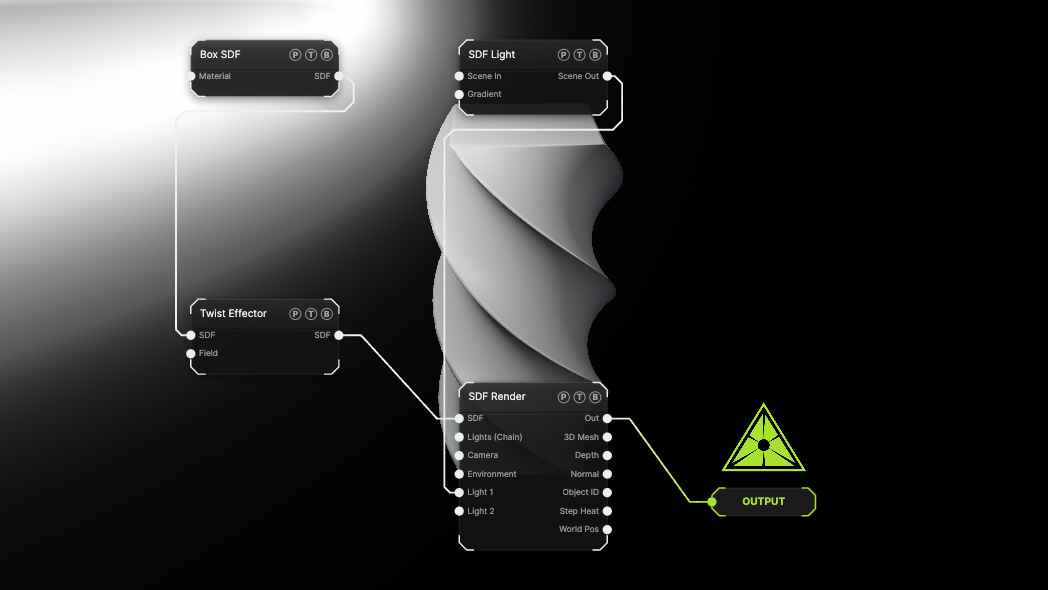
The image on the right is the example patch itself. Drag and drop it onto the app, or load it with File → Load, to open the full graph. A tall Box goes through a Twist of 120° per unit.
Inputs and outputs
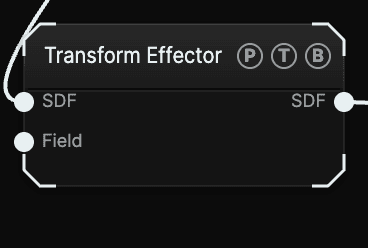
| Port | Type | Purpose |
|---|---|---|
| SDF | SDF | The field to modify. |
| Field | SDF | An SDF Field. Only the Displace effect reads it; other effects show an (unused) hint on the port. |
| SDF | SDF | The modified field. Effectors chain, so a Twist can feed a Grid Repeat. |
The node label follows the chosen effect, so a Twist reads as Twist Effector on the card.
Parameters
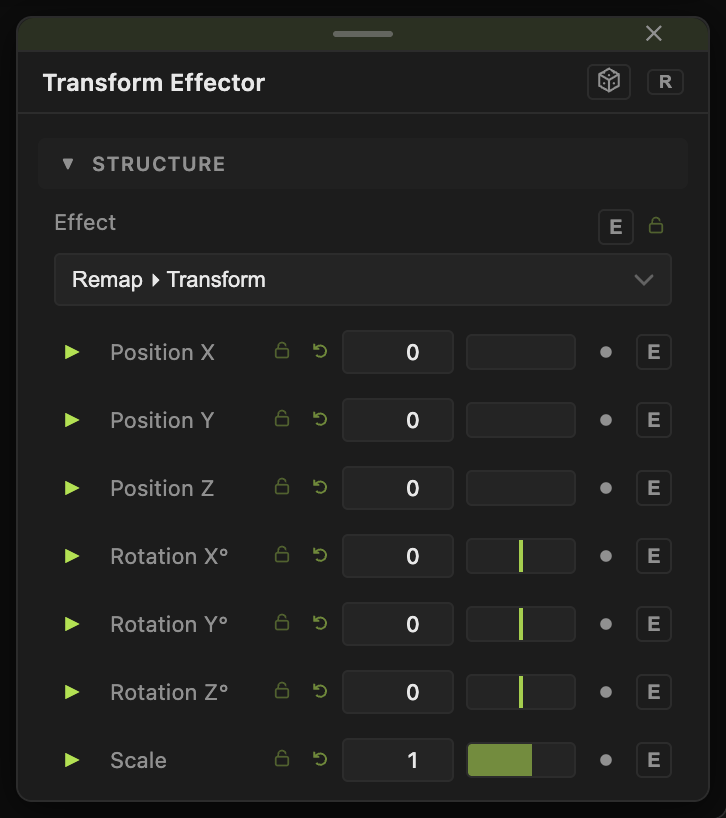
Effect picks the operator. Default Transform. Only the selected effect's controls show.
Warp
- Twist — Axis (X / Y / Z, default Y), Angle / Unit° (−1080 to 1080, default 180): rotation per unit of distance along the axis.
- Bend — Axis, Amount (default 0.4).
- Elongate — Stretch X / Y / Z (0–10): stretches the shape by inserting flat sections.
- Displace — Amount (default 0.2), scaled by the wired Field.
- Sine Warp — Amplitude (default 0.15), Frequency (default 3), Speed (default 0).
- Mobius Sweep — Ring Radius (default 1.5), Twists (½ per rev) (default 1), Spin Speed.
- Shear — Shear X (default 0.4), Shear Z.
- Spherize — Amount (default 0.5), Radius (default 1).
Repeat
- Linear Repeat — Axis, Spacing (default 1.5), Count (0=∞) (default 0).
- Grid Repeat — Spacing X / Y / Z (default 2) and Count X / Y / Z (0=∞).
- Polar Repeat — Axis, Count copies around the axis.
- Mirror Repeat — Axis, Spacing: repeats with every other copy flipped, which hides the seam.
- Shell Repeat — Shell Spacing (default 1.2), Count (0=∞): concentric copies.
- Helix Repeat — Step Spacing (default 1), Angle / Step° (default 30), Count (0=∞).
- Spiral Zoom — Zoom Factor (default 1.8), Twist / Ring°: self-similar log-spiral copies.
Mirror
- Mirror — Mirror X / Y / Z toggles (Z on by default) and Offset X / Y / Z.
- Octant Mirror — folds all three axes at once.
- Kaleidoscope — Axis, Segments (2–64, default 6), Rotation°.
Shell
- Onion Shell — Thickness (default 0.1): hollows the solid into nested shells.
- Round — Radius: inflates the field to round every edge.
- Invert — flips inside and outside.
- Quantize — Step Size: snaps the distance field, which gives a stepped look.
Remap
- Transform — the full Position / Rotation / Scale block plus Taper, Wobble, Wobble Scale, Wobble Speed, Round, Shell, the same set an SDF Primitive carries.
- Stretch Scale — Scale X / Y / Z: non-uniform scale.
- Limit Bounds — Bound Shape (Box or Sphere), Size X / Y / Z (default 4) or Radius (default 2): clips the field, which is how you stop an infinite repeat.
- Slice — Axis, Offset, Thickness (default 0.1): keeps one slab of the shape.
Every float has a per-parameter animation bar; Speed and Spin Speed animate on their own.
Examples
Endless corridor — Box into Grid Repeat, then Limit Bounds as a Box of Size 12.
Crystal — Octahedron into Kaleidoscope with Segments 8.
Rock — Sphere into Displace with an SDF Field set to Ridged Field.
Troubleshooting
Displace does nothing — the Field port needs an SDF Field wired in. Other effects ignore that port.
An infinite repeat kills the frame rate — give it a Count or follow it with Limit Bounds.