Animation & ControlModifiers
MIDI
Reads one MIDI CC as a value, with scale, offset, smoothing, and a recorded fallback.
The MIDI node listens to one controller number on one channel and outputs its value.

- Device, Channel, CC
- Use Recorded Value plays back a captured value without hardware
- Found in the node graph under Modifiers → Interactive
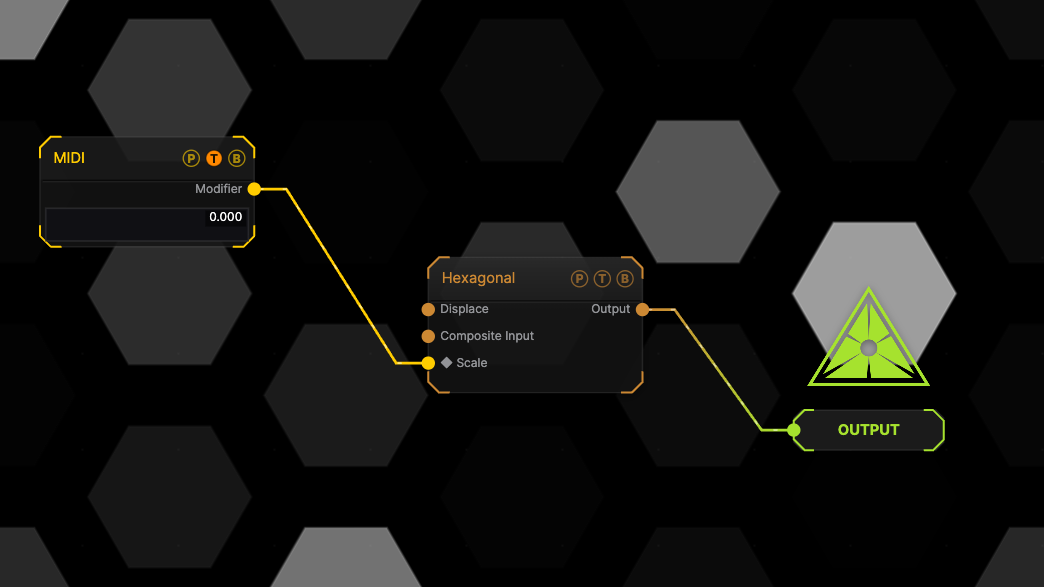
The image on the right is the example patch itself. Drag and drop it onto the app, or load it with File → Load, to open the full graph. Turn the mapped controller and the generator Scale follows.
Inputs and outputs

| Port | Type | Purpose |
|---|---|---|
| Modifier | Modifier | Drag it onto a parameter row, or wire it into another modifier's input. |
Parameters
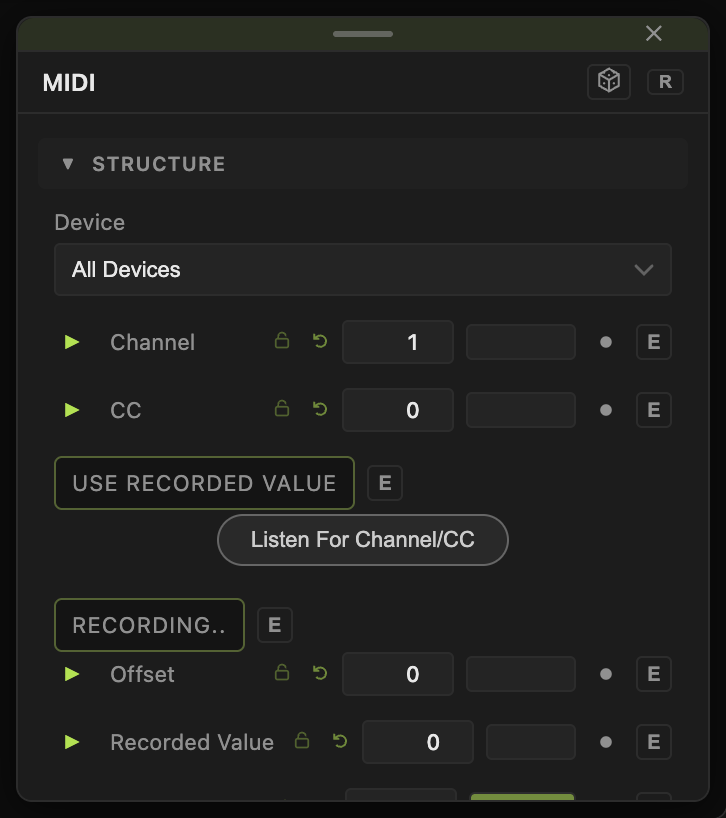
- Device (default All Devices), Channel (1–16, default 1), CC (0–127, default 0).
- Use Recorded Value (default off), Recording.. (arms capture), Recorded Value (0–1).
- Scale (default 1), Offset (default 0), Smoothing (default 0).
Every slider has a per-parameter animation bar and can itself be driven by another modifier.
Examples
Fader to opacity — CC 7 bound to Opacity with Operation Replace.
Troubleshooting
No response — MIDI is not enabled or the CC number is wrong. See MIDI Control.