Input & Output
Kinect Source
Opens an Azure Kinect, Orbbec Femto, or Kinect v2 and outputs its depth, colour, IR, body mask, and skeleton streams.
The Kinect Source node owns the device. Its five outputs feed Kinect Mesh, Kinect SDF, the Kinect Joint modifier, and any texture chain.
- Device Type, sensor modes, and FPS
- Depth clipping, hole filling, and temporal filtering
- Body Tracking and body masking
- Found in the node graph under I/O → I/O
Inputs and outputs

| Port | Type | Purpose |
|---|---|---|
| Composite Input | Texture | Composited under the source with Composite Mode and Composite Mix, which appear once wired. |
| Kinect | Kinect | The device payload for Kinect Mesh and Kinect SDF. |
| Color | Texture | The colour camera. |
| Depth | Texture | The depth image. |
| Mask | Texture | The body segmentation mask. |
| Skeleton | Texture | The tracked skeleton drawn as a texture. |
Parameters
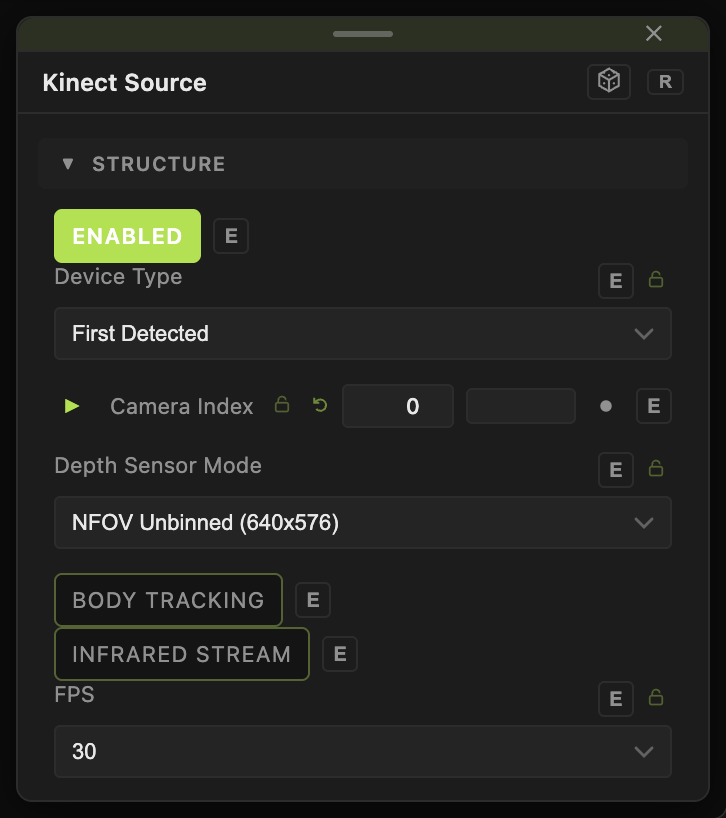
Opacity, Blend Mode, and Alpha are the standard operator header; see Parameters and Controls.
- Enabled (default on), Device Type (First Detected default, Azure Kinect / Kinect 4, Orbbec Femto, Kinect v2), Camera Index.
- Depth Sensor Mode (default NFOV Unbinned 640×576), Color Sensor Mode (default 720p), Color Detail, FPS (5, 15, 30).
- Body Tracking (default off), Infrared Stream (default off).
- Near Clip (m) (default 0.5), Far Clip (m) (default 4), Depth Clip Hardness, Edge Fade Width, Kinect Depth Scale.
- Hole Fill Iterations, Temporal Filter Depth (default on), Align Color And Depth (default on).
- Apply Body Masking with Body Mask Index Start / End.
Every slider has a per-parameter animation bar, so it can be animated, audio driven, or MIDI mapped.
Examples
Silhouette — Body Tracking on, the Mask output into a Gradient Colorizer.
Troubleshooting
No device — check the cable and that no other app holds the sensor; set Device Type by hand if First Detected picks the wrong one.